
1. Create a Plugin: To create a new plugin, run the following command from your project root:
- php artisan create:plugin
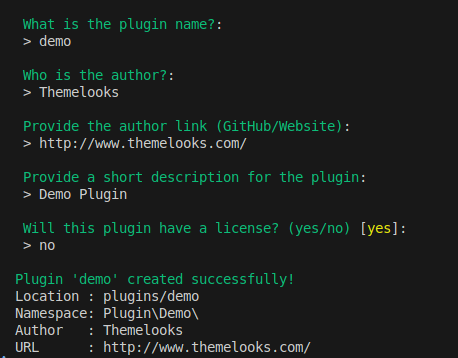
When the plugin is created successfully, a new folder will appear inside your plugins directory with your plugin name.
For example, if your plugin name is demo, the structure will look like this:
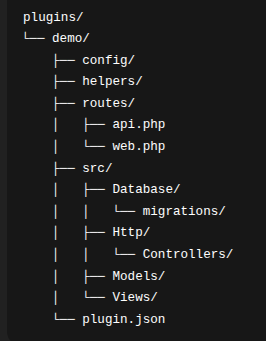
- config/ – Configuration files for the plugin.
- helpers/ – Helper functions used by the plugin.
- routes/api.php – API routes for the plugin.
- routes/web.php – Web routes for the plugin.
- src/Database/migrations/ – Migration files for the plugin tables.
- src/Http/Controllers/ – Controller classes for handling requests.
- src/Models/ – Eloquent models for the plugin.
- src/Views/ – Blade view files for the plugin UI.
- plugin.json – Plugin metadata and basic configuration.
2. Create Plugin Migration: To create a migration file for your plugin, use,
- php artisan create:migration plugin create_table --path="your-plugin-name"
Example:
- php artisan create:migration plugin create_your_table_name_table --path="demo"
Note:
- Replace your_table_name with your actual table name.
- "your-plugin-name" is the plugin name. Replace "your-plugin-name" (for example "demo") with your own plugin folder name.
After the migration is created, you will see the new migration file in this location inside your
plugin: plugins/your-plugin-name/src/Database/migrations
3. Run Plugin Migration: After creating the migration, run the plugin migration with:
- php artisan exec:migrate plugin your-plugin-name
Note: Here again, "your-plugin-name" is your plugin name. Replace "your-plugin-name" with your actual plugin name.